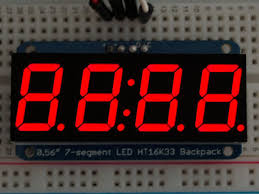
All over the world, peoples are working on energy solution. It would be a tough time for our next generation to survive if we don’t think about solution. Tony stark is working on a new project and wants to display his project using “seven segment display - concept”. Tony Stark gave Jarvis a task to find a number from his Favorite list of number for which the energy consumption is lowest.
(Assuming that for a digit to represent Tony stark is using 7 bulbs and only those bulbs light up which are required to represent a number and rest other would be completely off.)
Help Jarvis and conserve energy.
Seven segment display - https://en.wikipedia.org/wiki/Seven-segment_display
Input:
First line will contain the number of test cases and for every test case first line will contain length of favorite list and the second line for a test case will contain n numbers
Output:
For every test case print the answer. If there exist more than 1 numbers for which same number of bulbs are required than output the number which occurs first in the Favorite list.
Constraints:
Test cases< 10
A[i] < 10^6
Size of list < 10^5
SAMPLE INPUT
1
5
1 2 3 4 5
SAMPLE OUTPUT
1
Explanation
Number 1 needs only two bulbs to represent.
Number 1 needs only two bulbs to represent.
Code:
import java.io.IOException;
import java.io.InputStream;
import java.io.PrintWriter;
import java.util.HashMap;


public class Solution {


 public static void main(String args[]) throws IOException{
 InputReader in=new InputReader(System.in);
 PrintWriter out=new PrintWriter(System.out);
 int T=in.readInt();

 while(T-->0){
 long N=in.readLong();
 long min=222222222;
 long minnum=0;
 while(N-->0){
 long num=in.readCount();
 long count=in.getcount();
 if(count<min){
 min=count;
 minnum=num;
 }
 }
 out.println(minnum);
 out.flush();

 }

 out.close();

 }
}

class InputReader{
 InputStream in;
 int[] segment={6,2,5,5,4,5,6,3,7,6};
 long count=0;
 InputReader(InputStream in){
 this.in=in;
 }

 public long getcount(){
 return count;
 }
 private int read() throws IOException{
 return in.read();
 }


 public char readChar() throws IOException{
 int n=read();
 while(isWhiteSpace(n)){
 n=read();
 }
 return (char)n;
 }

 public int readInt() throws IOException{
 int number=0;
 int n=read();
 while(isWhiteSpace(n)){
 n=read();
 }
 while(!isWhiteSpace(n)){
 int integer=n-'0';
 number*=10;
 number+=integer;
 n=read();
 }
 return number;
 }

 public long readCount() throws IOException{
 long number=0;
 count=0;
 int n=read();
 while(isWhiteSpace(n)){
 n=read();
 }
 while(!isWhiteSpace(n)){
 int integer=n-'0';
 count+=segment[integer];
 number*=10;
 number+=integer;
 n=read();
 }
 return number;
 }


 public long readLong() throws IOException{
 long number=0;
 int n=read();
 while(isWhiteSpace(n)){
 n=read();
 }
 while(!isWhiteSpace(n)){
 int integer=n-'0';
 number*=10;
 number+=integer;
 n=read();
 }
 return number;
 }

 private boolean isWhiteSpace(int n){
 if(n=='\n'||n=='\r'||n=='\t'||n==' '||n==-1){
 return true;
 }else{
 return false;
 }

 }
 }
Comments
Post a Comment